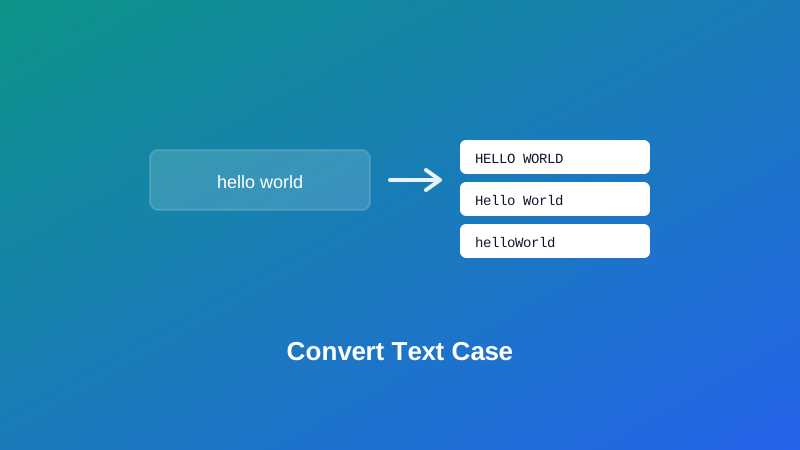
Someone forwards you an email typed entirely in caps, or you're staring at a heading that needs to read consistently across a whole menu, or you've written out a variable name in plain English and need it in camelCase before it'll compile. Retyping any of that by hand is slow, and it's exactly the kind of task where a stray typo sneaks in on the third word you manually recapitalize.
This guide covers every case style My PDF's Case Converter handles, what each one actually does to your text, and — since it trips up more people than you'd expect — the real difference between what most web tools call "Title Case" and what a style guide actually means by it.
The Case Styles This Tool Converts Between
Eight styles are available, covering both everyday writing and programming conventions:
| Style | Example output from "hello world example" |
|---|---|
| UPPERCASE | HELLO WORLD EXAMPLE |
| lowercase | hello world example |
| Title Case | Hello World Example |
| Sentence case | Hello world example |
| camelCase | helloWorldExample |
| PascalCase | HelloWorldExample |
| snake_case | hello_world_example |
| kebab-case | hello-world-example |
The first four are aimed at ordinary writing — headings, labels, pasted text that arrived in the wrong case. The last four are aimed at code, where a specific naming convention is usually expected rather than optional.
The One Thing Worth Knowing About "Title Case"
This is worth being upfront about, because it's the single most common source of confusion with any case converter, not just this one.
Proper editorial title case — the kind used in book titles, headlines, and formal publishing under style guides like AP or Chicago — capitalizes major words but keeps short articles, conjunctions, and prepositions lowercase, unless they're the first or last word of the title. That's why a real book title reads "The Lord of the Rings," not "The Lord Of The Rings" — "of" and "the" stay lowercase in the middle of the title.
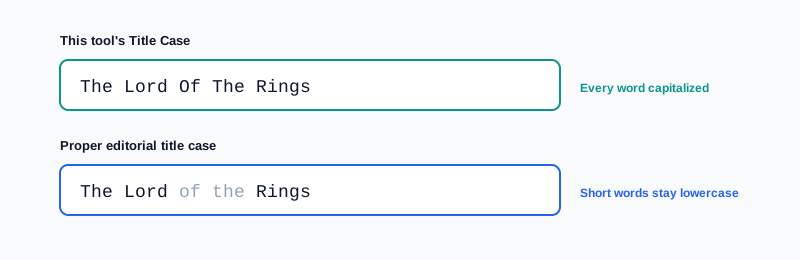
This tool's Title Case mode capitalizes every single word, which is the simpler, far more common convention used across most web-based case converters. It's genuinely useful for UI labels, headings, and anywhere consistency matters more than editorial precision — but it isn't a substitute for a real style guide if you're formatting something for formal publishing. For that, a quick manual pass to lowercase the short connecting words afterward gets you the rest of the way.
Sentence Case: How It Decides Where Sentences Start
Sentence case capitalizes the very first letter of your text, plus the first letter following a period, question mark, or exclamation point that's followed by a space. It's a straightforward, predictable rule — and like any rule based on punctuation alone, it has one honest limitation worth knowing about.
An abbreviation like "Mr. Smith" or "e.g. this example" contains a period that isn't actually ending a sentence, but the rule can't tell the difference between that and a genuine sentence break. Running text full of abbreviations through Sentence case can occasionally capitalize a word that shouldn't be capitalized. It's worth a quick read-through afterward if your text leans heavily on abbreviations.
The Programming Case Styles: camelCase, PascalCase, snake_case, and kebab-case
These four exist for a different reason entirely — matching a specific naming convention that a programming language, framework, or style guide expects:
- camelCase — the first word lowercase, every word after it capitalized, no separators. The standard for variable and function names in JavaScript and many other languages.
- PascalCase — every word capitalized, no separators. Common for class names and component names (think React components).
- snake_case — every word lowercase, joined with underscores. Standard in Python variable names and common in database column naming.
- kebab-case — every word lowercase, joined with hyphens. The convention for URLs, CSS class names, and many config file names.
To build these, the tool first breaks your input into individual words — splitting on spaces and punctuation, and also on the transition from a lowercase to an uppercase letter within a single pasted word. That means pasting myVariableName, my-variable-name, or my variable name all correctly split into the same three words before being rebuilt in whichever style you choose, rather than treating an already-cased input as one solid, unsplittable chunk.
How to Convert Text Case, Step by Step
Step 1: Open the Case Converter
Go to My PDF's Case Converter. No installation or account needed.
Step 2: Paste Your Text
Any length works — a single word, a heading, or a full paragraph.
Step 3: Choose a Case Style
Pick from the eight options based on what you're actually producing — a heading, a sentence, or a specific naming convention for code.
Step 4: Copy the Result
The converted text updates instantly and is ready to paste wherever it's needed.
Practical Examples
Fixing an all-caps email or document. Text pasted from an old system or someone's Caps-Lock mishap converts cleanly to Sentence case or lowercase in one pass, instead of retyping it by hand.
Building a consistent set of menu headings. A list of page titles pulled from different sources, in inconsistent cases, becomes uniform Title Case in one operation — a good fit for navigation labels where consistency matters more than style-guide nuance.
Turning a description into a variable or component name. "user first name" becomes userFirstName for a JavaScript variable via camelCase, or UserFirstName for a component via PascalCase — no manual retyping or risk of a missed capital letter.
Creating a clean URL slug from a page title. "How to Convert Text Case Online" becomes how-to-convert-text-case-online via kebab-case, matching standard URL conventions.
Common Mistakes When Converting Text Case
Assuming Title Case here matches AP or Chicago style exactly. As covered above, this mode capitalizes every word. For formal editorial title case, do a quick manual pass afterward to lowercase short connecting words.
Not double-checking Sentence case on text with abbreviations. A period after "Mr" or "e.g." can trigger an unintended capital letter — worth a quick read-through on text that uses abbreviations heavily.
Converting proper-noun-heavy text to UPPERCASE or lowercase without a backup. Automatic case conversion can't distinguish "NASA" or a person's name from an ordinary word — keep your original text on hand if you'll need the correct capitalization back later.
Mixing up which programming case style fits which context. camelCase for JavaScript variables, PascalCase for components and classes, snake_case for Python and databases, kebab-case for URLs and CSS — using the wrong one is a quick way to clash with a project's existing conventions.
Pasting text with unusual punctuation and not checking the split. Apostrophes, dashes, or uncommon symbols can affect exactly where word boundaries land in the programming case styles — a fast scan of the output catches this immediately.
Tips & Best Practices
- Use Title Case here for UI labels and headings where consistency matters more than editorial precision, and manually adjust short connecting words for anything formally published.
- Read through Sentence case output on abbreviation-heavy text, since punctuation-based rules can't distinguish "Mr." from an actual sentence break.
- Match the programming case style to its actual convention — camelCase and PascalCase for code, snake_case for Python and databases, kebab-case for URLs and CSS.
- Keep an original copy of proper-noun-heavy text before converting to UPPERCASE or lowercase, since automatic conversion treats every word the same way.
- If your text is trapped inside a PDF, pull it out first with PDF to Text, then run the extracted text through the case converter.
Key Takeaways
- Eight case styles are available: UPPERCASE, lowercase, Title Case, Sentence case, camelCase, PascalCase, snake_case, and kebab-case.
- This tool's Title Case capitalizes every word — proper editorial title case keeps short articles and prepositions lowercase, which needs a quick manual adjustment if that precision matters.
- Sentence case relies on punctuation, so abbreviation-heavy text is worth a quick read-through afterward.
- The programming case styles split words on punctuation and on lowercase-to-uppercase transitions, so pasted camelCase or kebab-case input converts correctly into any other style.
- Automatic case conversion can't recognize proper nouns or acronyms — keep an original copy of anything where that capitalization matters.
Related Reading
If you're checking exactly how much text you're working with, how to count words and characters in your text pairs naturally with this tool. For more guides like this one, browse the full blog or the complete tools directory. For background on how letter casing works as a written convention, see Wikipedia's entry on letter case.
Got text in the wrong case right now? Open the Case Converter and get it fixed in seconds.
Comments
Comments aren't open on the blog yet. In the meantime, share this article using the buttons above, or reach us directly at contact@mypdf.tech.