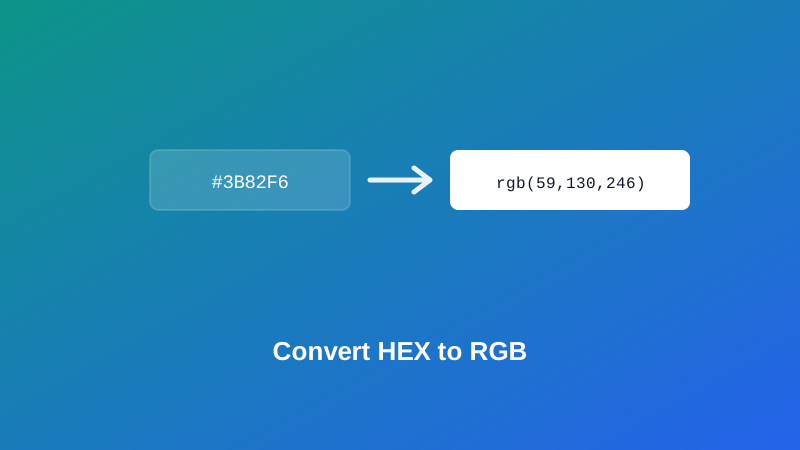
A brand guideline hands you a color as #3B82F6. The code you're actually working in — a canvas API, a design tool's color panel, a chart library — wants rgb(59, 130, 246) instead. There's no obvious way to get from one to the other in your head, and guessing is exactly how you end up with a color that's close but subtly, annoyingly wrong.
This guide covers what a hex code actually represents, how the conversion to RGB works under the hood, and the one detail about 3-digit shorthand hex that trips up more people than the rest of this combined.
What a HEX Color Code Actually Is
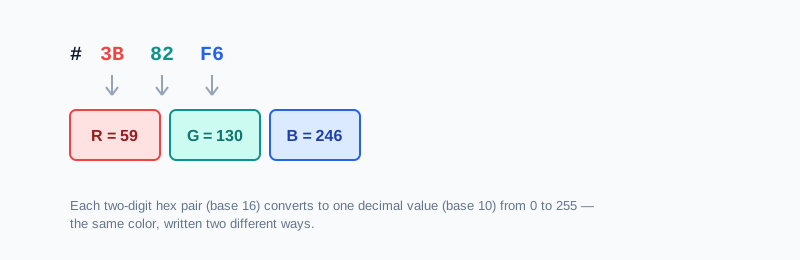
Here's the part worth understanding first, because it reframes everything else: a hex code isn't a different kind of color from RGB. It's the exact same red, green, and blue values — each from 0 to 255 — just written in base 16 instead of base 10.
#3B82F6 breaks into three pairs: 3B, 82, and F6. Each pair is one channel's value written in hexadecimal instead of decimal. Convert each pair to a regular base-10 number, and you get exactly the RGB values for the same color: 59, 130, 246.
My PDF's HEX to RGB Converter and RGB to HEX Converter do exactly this math, instantly, with a live swatch so you can confirm the color looks right either way.
Why Two Digits Per Channel, and What 3-Digit Shorthand Actually Expands To
Each hex digit can represent 16 possible values (0 through 9, then A through F). Two hex digits together give 16 × 16 = 256 possible values — exactly matching RGB's 0-to-255 range per channel. 00 is 0, FF is 255, and everything in between maps one-to-one. That's not a coincidence; hex was chosen specifically because two digits line up perfectly with an 8-bit color channel.
This is where the genuinely common mix-up happens. A 3-digit shorthand hex code, like #3BF, doesn't expand by adding a zero to each digit. It expands by doubling each digit: #3BF becomes #33BBFF, not #3B0F0 or anything padded with zeros. Each single digit in the shorthand stands in for that same digit repeated twice.
HEX vs. RGB: When Each One Actually Matters
Since they're the same color, choosing between them is about convenience, not correctness:
- HEX is compact — one short string instead of three separate numbers — which is why it's the default in most CSS, design tools, and brand guidelines.
- RGB is the better choice when you need to add transparency, since
rgba()needs the three channels written out separately with an alpha value alongside them, or when you're doing programmatic color math like blending or adjusting brightness, where working with plain numbers is more direct than parsing a hex string.
Neither is more "correct" than the other — converting between them never changes the actual color, only how it's written down.
How to Convert HEX to RGB, Step by Step
Step 1: Open the HEX to RGB Converter
Go to My PDF's HEX to RGB Converter. No installation or account needed.
Step 2: Enter Your HEX Code
Both 6-digit (#3B82F6) and 3-digit shorthand (#3BF) codes are accepted, with or without the leading #.
Step 3: Read the RGB Result
The matching rgb(r, g, b) value appears instantly, alongside a live color swatch to confirm it's the color you expected.
How to Convert RGB to HEX, Step by Step
Step 1: Open the RGB to HEX Converter
Go to My PDF's RGB to HEX Converter.
Step 2: Enter Your RGB Values
Type the three channel numbers, either as plain comma-separated values (59, 130, 246) or in full rgb(59, 130, 246) form.
Step 3: Copy the HEX Code
The matching hex code appears instantly, ready to paste into CSS or a design tool.
Practical Examples
Converting a brand guideline's hex code for a canvas or charting library. Many graphics APIs expect separate numeric RGB channels rather than a hex string. Converting the brand's official hex color to RGB first means the chart or canvas element matches exactly, rather than approximating it by eye.
Converting an eyedropper's RGB reading into hex for CSS. A design tool's color picker often reports RGB values directly. Converting to hex gives you the compact form most CSS codebases expect.
Double-checking a 3-digit shorthand before using it elsewhere. If you're not fully confident a shorthand hex code expands the way you think, running it through the converter confirms the exact 6-digit equivalent before it ends up somewhere that matters.
Adding transparency to an existing brand color. Starting from a hex-defined brand color, convert it to RGB first, then reuse those same three numbers inside an rgba() value with an alpha channel added — the color itself stays identical, only the transparency is new.
Common Mistakes When Converting Between HEX and RGB
Assuming 3-digit shorthand pads with a zero. It doesn't — each digit is doubled, not padded. #3BF is #33BBFF, not something with zeros mixed in.
Treating hex and RGB as two different colors that need to "match." They're two representations of the identical color. If a converted result looks different from what you expected, the conversion was likely entered incorrectly, not evidence of a mismatch between formats.
Forgetting each RGB channel has to stay within 0–255. A value like 300 is outside the valid range and will be rejected — double-check any RGB values you're typing by hand.
Dropping or adding the # inconsistently. Hex codes conventionally include a leading # in CSS, but plenty of systems accept the code with or without it — check what the destination actually expects.
Mixing up channel order when converting by hand. RGB is always red, then green, then blue, in that order — an easy detail to get turned around when working quickly without a tool doing the conversion for you.
Tips & Best Practices
- Use hex for CSS and design tools, where compactness is the main advantage, and RGB when you need transparency or programmatic color math.
- Double-check 3-digit shorthand by doubling each digit mentally, rather than assuming or guessing at the expansion.
- Use Color Picker if you want to see hex, RGB, and HSL for a color all at once, rather than converting one pair at a time.
- Copy and paste values rather than retyping them by hand, especially for RGB numbers, to avoid a transcription slip.
- Remember conversion never changes the color — if a result looks wrong, recheck the input rather than assuming the tool made an error.
Key Takeaways
- A hex code and its RGB equivalent describe the exact same color — hex is just RGB written in base 16 instead of base 10.
- Two hex digits per channel line up precisely with RGB's 0-to-255 range, since 16 × 16 equals 256.
- 3-digit shorthand hex expands by doubling each digit, not padding with zeros — a common and easy mistake to make by hand.
- Choose hex for compactness in CSS and design tools, and RGB when you need transparency or to do color math with separate numeric channels.
- Converting between formats never changes the actual color — a wrong-looking result almost always means the input was entered incorrectly.
Related Reading
If you're building a full set of matching colors rather than converting a single one, how to generate a color palette online covers picking a base color and generating a harmonious set around it. For more guides like this one, browse the full blog or the complete tools directory. For deeper background on how RGB color works, see Wikipedia's entry on the RGB color model.
Got a color to convert right now? Open HEX to RGB or RGB to HEX and get your result in seconds.

Comments
Comments aren't open on the blog yet. In the meantime, share this article using the buttons above, or reach us directly at contact@mypdf.tech.