Somewhere between "how many days until the deadline" and "how long has this contract actually been running," most people reach for the same flawed tool: scrolling through a phone calendar app, tapping each day, and hoping they didn't lose count around week three. It works, technically, right up until the range spans a leap year, crosses a few different-length months, or just gets long enough that a single miscount changes the answer without you noticing.
This guide walks through what a date difference calculator actually does, the one mix-up — calendar days versus business days — that causes more missed deadlines than almost any other date-math error, a few worked examples pulled from situations that actually come up, and exactly how to get an accurate count in a few clicks.
What a Date Difference Calculator Actually Does
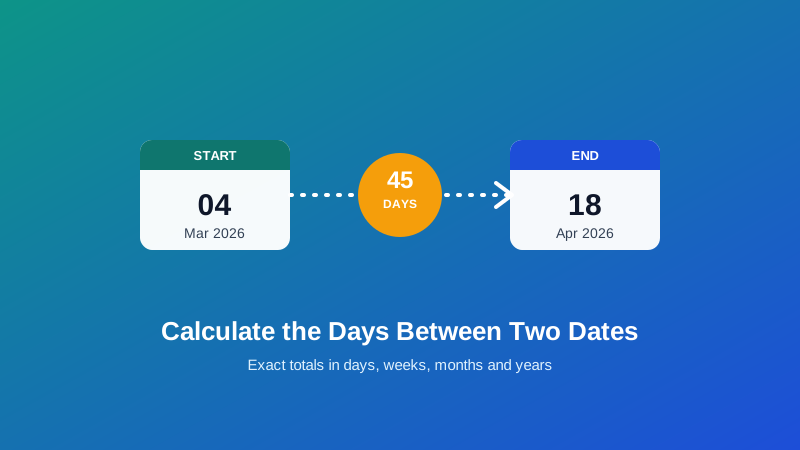
A date difference calculator takes two dates you choose — a start date and an end date, in either order — and works out precisely how much time separates them: total days, total weeks, and an approximate months-and-years breakdown. My PDF's Date Difference Calculator does this instantly in your browser the moment both dates are set, with no upload, no account, and no data sent anywhere.
The key word is "precisely." Unlike a rough mental estimate, the tool doesn't average anything — it walks the actual calendar, accounting for the fact that months run anywhere from 28 to 31 days and that February gets an extra day in leap years. That's the exact same kind of real calendar arithmetic covered in our guide on calculating exact age, just applied to any two dates you pick rather than a birth date and today.
It also doesn't care which date comes first. Enter the later date as the "start" and the earlier one as the "end," and you'll still get the correct absolute difference, along with a clear note about which direction the gap actually runs.
Why This Comes Up More Than You'd Think
Counting the gap between two dates sounds like a narrow, occasional need. In practice, it's one of the more common small calculations people run, across some very different contexts:
- Project and business deadlines. How many days remain until a deliverable is due, or how many days a task has already been in progress.
- Travel planning. How many nights a trip covers, or how many days you've spent in a region against a visa limit (more on this below).
- Leases, contracts and subscriptions. The exact duration of a rental agreement, a fixed-term contract, or how many days are left on a free trial before billing kicks in.
- Event countdowns. Days until a wedding, a conference, a product launch, or a moving date.
- Medical and pregnancy tracking. Counting weeks and days relative to a known reference date, where healthcare providers work in exact day counts rather than rough months.
- HR and payroll. The exact length of an employee's leave, notice period, or probation window.
None of these need a spreadsheet formula or a mental math trick. They need one accurate number, and they need it fast.
Calendar Days vs. Business Days: The Mistake That Actually Costs People Deadlines
Here's the distinction that trips up more deadlines than almost anything else in this space: a "day" in a legal, contractual or business context usually doesn't mean what you'd assume.
When a contract says "you have 10 days to respond," that almost always means 10 calendar days — every day on the calendar counts, weekends included. But when it says "10 business days," weekends (and often public holidays) are skipped entirely, which stretches that same 10-day window across roughly two full weeks instead of a week and a half.
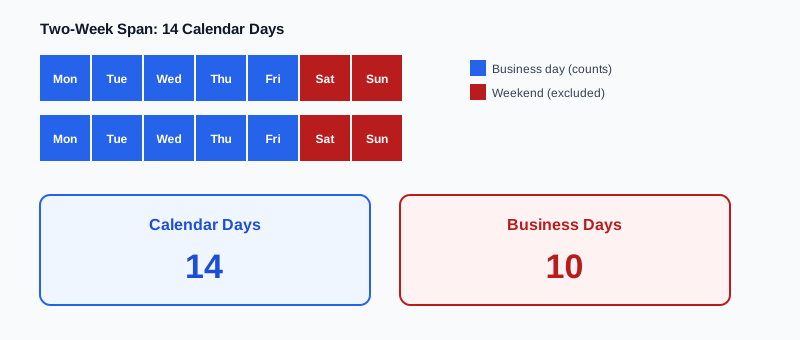
Say a task is assigned on a Wednesday with "5 business days" to complete it. Counting forward — Thursday, Friday, then skipping Saturday and Sunday entirely, then Monday, Tuesday, Wednesday — the actual deadline lands on the following Wednesday, a full 7 calendar days later, not 5. That gap between the two counting methods is exactly where deadlines get missed by people who counted correctly but assumed the wrong unit.
My PDF's Date Difference Calculator reports the exact calendar-day total between two dates. If your situation specifies business days instead, use that total calendar-day figure as your starting point and manually exclude weekends (and any relevant holidays) from the range, since business-day rules vary by contract, jurisdiction and company policy in ways a general-purpose calculator can't assume for you.
How to Calculate the Difference Between Two Dates, Step by Step
Step 1: Open the Date Difference Calculator
Go to My PDF's Date Difference Calculator. No account or installation needed.
Step 2: Choose Your Start Date
Pick the earlier date using the date field — or any date at all, really, since the tool doesn't require the start date to actually come first.
Step 3: Choose Your End Date
Pick the second date you want to compare against. This can be in the past, the present, or the future.
Step 4: Read the Result
You'll instantly see the total number of days between the two dates, along with the equivalent in weeks, and an approximate months/years breakdown. If the end date falls before the start date, the tool clearly flags the direction rather than just showing a negative number that's easy to misread.
A Practical Example: Tracking a Visa Day Limit
Here's a situation where getting the exact count right genuinely matters: many visa-free travel arrangements — the Schengen area's 90-day rule is the best-known example — limit visitors to a set number of days within a rolling period, not a fixed calendar year.
Under that rule, a non-EU traveler can spend a maximum of 90 days within any 180-day window across the Schengen area. That's not "90 days per year" — it's a sliding window, which means the relevant count constantly shifts as time moves forward.
- Note the date of your most recent entry into the region and the date you plan to leave.
- Open Date Difference Calculator, enter those two dates, and read the total day count for that single trip.
- Add that figure to the days spent on any other trips within the trailing 180 days, using the same tool for each date range, to check the running total against the 90-day cap.
Getting this wrong isn't a minor inconvenience — overstaying a visa-free limit can affect future entry. When the number actually matters this much, a precise day count beats a rough guess every time.
Date Difference Calculator vs. Age Calculator: Which One Do You Need?
These two tools solve closely related problems, but they're built for different questions:
| Tool | Compares | Best for |
|---|---|---|
| Date Difference Calculator | Any two dates you choose | Deadlines, trip lengths, contract durations, days until an event |
| Age Calculator | A date of birth → today | Someone's current exact age, right now |
If both dates in your question are dates you're actively choosing — a start date and an end date, neither one fixed to "today" — Date Difference Calculator is the right pick. If the question is specifically "how old is this person as of right now," Age Calculator is built exactly for that, though it can't compare two arbitrary custom dates the way this tool does.
Common Mistakes When Calculating a Date Difference
Assuming "days" always means calendar days. As covered above, contracts and official notices frequently mean business days instead — always check the wording before you count.
Forgetting the range is inclusive or exclusive. Depending on context, "the difference between March 1 and March 10" might mean 9 days or 10, depending on whether both endpoints get counted. Be clear on which convention applies to your situation before treating the raw day count as final.
Manually adding up months by assuming 30 days each. This shortcut compounds error across longer spans, since real months range from 28 to 31 days.
Missing a leap year in a multi-year span. An extra day every four years is easy to overlook by hand, but it's exactly the kind of detail that shows up as a one-day discrepancy in manual arithmetic.
Not re-checking a rolling window. For anything based on a trailing period — like the 90/180 visa example — the relevant count changes daily. A total that was accurate last week may no longer be accurate today.
Tips & Best Practices
- Use the total-days figure as your source of truth. It's exact; the months/years breakdown is a calendar-based approximation and is best treated as a helpful summary, not the precise number.
- Double-check whether a rule means calendar days or business days before treating a raw date-difference result as your final answer.
- For rolling-window limits, recalculate regularly rather than relying on a count you did once weeks ago.
- Enter dates in whichever order is convenient. The tool reports the correct absolute difference regardless of which one you pick as "start."
- Nothing you enter leaves your browser. The calculation runs entirely client-side, so a personal date range — a lease term, a medical reference date — is never transmitted or stored.
Key Takeaways
- A date difference calculator gives you the exact number of days between any two dates, using real calendar arithmetic rather than a rounded estimate.
- The single biggest source of missed deadlines in this space is confusing calendar days with business days — always check which one a contract or notice actually means.
- For rolling-window limits like the Schengen 90/180-day rule, recalculate regularly, since the relevant total shifts with every day that passes.
- Treat the total-days figure as exact and the months/years breakdown as a helpful approximation, not the other way around.
- Everything runs locally in your browser, so the dates you enter — including sensitive ones like a lease term or medical reference date — are never transmitted anywhere.
Related Reading
If your question is really about someone's current age rather than the gap between two custom dates, how to calculate your exact age covers that specific case in more depth. For the official rules behind the visa example above, see the European Commission's guidance on the Schengen short-stay 90/180-day rule. For more free calculators and guides, browse the full blog or the complete tools directory.
Need an exact day count right now? Open the Date Difference Calculator and get your answer in seconds.



Comments
Comments aren't open on the blog yet. In the meantime, share this article using the buttons above, or reach us directly at contact@mypdf.tech.