"Lorem ipsum dolor sit amet, consectetur adipiscing elit." If you've spent any time around design mockups, website templates, or half-built layouts, you've seen this line more times than you could count. It looks like Latin, reads like nothing in particular, and shows up in the exact spot where real content is supposed to go eventually. Most people who use it every week have never actually looked into what it says or where it came from.
This guide covers exactly that — what Lorem Ipsum actually is, why it's still the default choice for filler text decades into the era of instant AI-generated copy, and how to generate precisely the amount you need for a mockup, a print layout, or a template, without accidentally leaving it somewhere it shouldn't be.
What Lorem Ipsum Actually Is
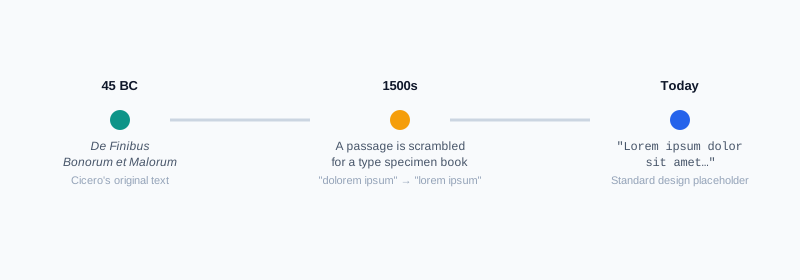
Lorem Ipsum isn't gibberish, and it isn't nonsense someone typed at random. It's altered Latin, taken from a real classical text: a passage from Cicero's De Finibus Bonorum et Malorum ("On the Ends of Good and Evil"), written in 45 BC. Somewhere around the 1500s, a printer scrambled a section of that text to use as filler for a type specimen book, and the phrase "dolorem ipsum" — roughly "pain itself" — got cut and rearranged into "lorem ipsum," the fragment that gave the whole passage its name.
Over the centuries since, it's been altered further, mixed with invented words, and reused so extensively that what you see today isn't a faithful quote from Cicero anymore — it's a layout tool that happens to be built out of real Latin roots.
Why Designers and Developers Still Use It
It would be easy to assume placeholder text is a relic from before content was easy to generate, but it's still the standard for a good reason: it keeps a review focused on layout, not wording.
- It separates visual approval from content approval. A stakeholder reviewing a homepage mockup can judge spacing, hierarchy, and readability without getting pulled into debating a sentence that isn't final anyway.
- Real content often isn't ready yet. Design and copy don't always finish on the same schedule — a layout frequently needs sign-off before the actual words exist.
- It avoids a specific kind of distraction. Filler text written in plain English tends to get read and reacted to, even when it's clearly a placeholder — someone will always comment on the joke paragraph you dropped in as a stand-in. Latin that nobody's fluent in sidesteps that entirely.
- It's genuinely fast. Generating a paragraph takes a couple of clicks, which matters when you're iterating on a layout dozens of times before anything is final.
How to Generate Lorem Ipsum Text, Step by Step
Step 1: Open the Lorem Ipsum Generator
Go to My PDF's Lorem Ipsum Generator. No installation or account needed.
Step 2: Choose Paragraphs, Sentences, or Words
Pick whichever unit matches what you're actually testing — paragraphs for a body of text, sentences for a short callout, or an exact word count when a component has a strict length limit.
Step 3: Set the Amount
Enter how many of that unit you need, from 1 up to 50.
Step 4: Decide Whether to Start With the Classic Opening
Leave "Start with 'Lorem ipsum dolor sit amet…'" checked for the familiar, recognizable opening line, or switch it off if you'd rather every generation look a little less identical to every other mockup you've seen.
Step 5: Copy or Download the Result
The text updates instantly and is ready to copy straight into your design tool or codebase, or download as a plain text file if you need it saved for later.
What's Different About This Generator's Output
Worth being upfront about this, since it trips people up if they're expecting something specific: this generator doesn't reproduce one long, memorized passage word for word every time. The classic opening line — "Lorem ipsum dolor sit amet, consectetur adipiscing elit" — appears when you leave that option checked, but everything after it is freshly assembled from the same pool of roughly seventy traditional Lorem Ipsum words, recombined at random into new sentences each time you generate.
That means two things worth knowing going in: every batch of text is unique rather than an identical repeat of "the" canonical passage, and it isn't meant to be a literal quotation from Cicero's original work — even the "real" version in wide use today has drifted from the source over centuries of reuse, so this generator continues that same tradition rather than breaking from it.
Practical Examples
Testing how a text block reads at a specific width. Drop three paragraphs into a mockup to see how body copy wraps, whether line spacing feels right, and where a column might run uncomfortably long before real content exists to check against.
Filling a print layout to test column length. Use word count mode to generate an exact number of words and see whether a brochure column or newsletter section comfortably fits the space allotted, without guessing at paragraph count.
Populating a template during development. Fill a CMS entry or component library with placeholder text so a stakeholder can review how a page actually looks with content in it, rather than staring at empty boxes and trying to imagine the result.
Previewing a pull-quote or callout at a specific length. Generate just one or two sentences to check how a short, prominent piece of text behaves in a tight layout, like a header banner or a highlighted quote box.
Common Mistakes When Using Placeholder Text
Shipping it to a live page by accident. This is the classic, slightly embarrassing mistake — a paragraph of Latin filler left behind on a page that went live, usually because it was never on anyone's final content checklist. Search engines and screen readers see meaningless text where real content should be, which is a real problem, not just a cosmetic one.
Testing with far too little text. A single short line doesn't reveal how a layout actually handles a full paragraph, text wrapping, or overflow — problems that only show up once there's enough content to stress the design.
Testing with far too much text. The opposite mistake is just as common: dropping fifty paragraphs into a component meant to hold two sentences doesn't tell you anything useful either, since it's testing a scenario the real content will never actually produce.
Letting reviewers fixate on the placeholder itself. Even Latin filler occasionally distracts a reviewer who starts asking what it says. If that keeps happening with a specific audience, representative real-language sample text can sometimes be a better fit than Lorem Ipsum for that particular review.
Assuming Latin word lengths represent your actual content. Different languages run longer or shorter on average — German compound words, for instance, tend to be noticeably longer than their English or Latin equivalents. A layout that wraps cleanly with Lorem Ipsum can behave differently once it's holding the real language your content will actually be written in.
Tips & Best Practices
- Match the amount to realistic content length, not a convenient round number, so the test actually reflects what the layout will hold.
- Use word count mode for strict limits — testing an exact character or word cap is more reliable than eyeballing paragraph count.
- Search the page for "lorem" before anything goes live. It takes seconds and catches the single most common mistake with placeholder text.
- Check your word count with a dedicated tool if a component has a hard limit — the Word Counter gives an exact count for anything you paste in, useful for confirming generated text lands where you expect.
- Swap in representative real-language content for final-stage reviews, especially for anything where actual word length or rhythm might reveal a layout problem Latin filler hides.
Key Takeaways
- Lorem Ipsum is altered Latin drawn from a real classical text, not random gibberish — its familiar shape is exactly what makes it work as filler.
- It's still the standard choice because it separates layout review from content review, without distracting reviewers the way readable filler text would.
- This generator builds fresh text from the traditional Lorem Ipsum word pool each time, rather than repeating one memorized passage verbatim.
- Match the amount generated to realistic content length, and always check a live page for leftover placeholder text before it ships.
- Different languages run longer or shorter than Latin on average, so a layout that wraps cleanly with Lorem Ipsum is still worth double-checking once real content is in place.
Related Reading
If you're testing how much text actually fits a design and need an exact count, how to count words and characters in your text pairs naturally with this. If your mockup is a print layout headed for a PDF proof, preparing PDFs for print and web covers getting it to the right paper size with the Resize PDF tool before it goes to a printer. For more guides like this one, browse the full blog or the complete tools directory. For the full textual history behind the passage, see Wikipedia's entry on Lorem Ipsum.
Need placeholder text for a layout right now? Open the Lorem Ipsum Generator and get exactly the amount you need in seconds.
Comments
Comments aren't open on the blog yet. In the meantime, share this article using the buttons above, or reach us directly at contact@mypdf.tech.