You're signing up for something, you type a password, and a bar slides from red toward green as you go. Most people watch that bar the way they'd watch a phone's signal strength — trusting the color without ever wondering what it's actually measuring. It's worth knowing, because "green" on one site's checker and "green" on another can mean genuinely different things depending on what's happening behind it.
This guide covers exactly what a password strength score is built from, why a long plain password often beats a short clever one, and what the rating actually tells you — and doesn't — so a "Strong" result means something real instead of just a reassuring color.
What a Password Strength Checker Actually Measures
This isn't a lookup against a global database of real breached passwords, and it isn't magic. My PDF's Password Strength Checker runs a scoring formula entirely on your device, built from a handful of concrete, checkable signals:
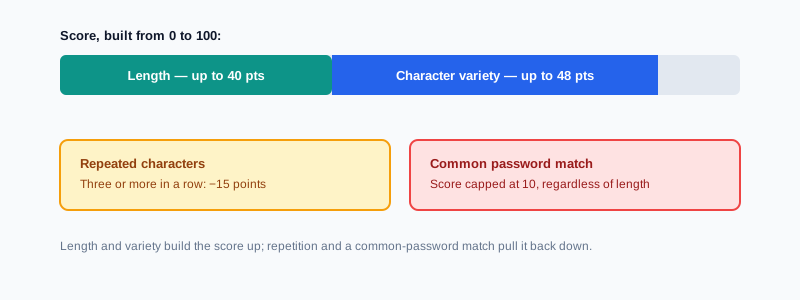
- Length, which contributes the largest single share of the score, up to a cap — so a longer password consistently scores better than a shorter one, all else being equal.
- Character variety — whether your password includes lowercase letters, uppercase letters, numbers, and symbols. Each category present adds to the score.
- Obvious repetition. Three or more of the same character in a row counts against the score, since that kind of pattern is trivially guessable.
- A check against a short list of the most notoriously common passwords — things like "password," "123456," and "qwerty." Matching one of these caps the score low no matter what else is true about it, since these specific strings are the very first thing any real attempt at guessing tries.
Why Length Matters More Than a Clever Substitution
This connects directly to something covered in more mathematical detail in our guide to generating a strong password: every character you add multiplies the number of possible combinations, while adding a new character type to an already-short password only multiplies it by a small, comparatively modest factor.
The scoring here reflects that same reality in practice. Length contributes the largest chunk of the score, up to a cap reached at a modest character count, while character variety adds smaller increments on top. That's why a password like correcthorsebatterystaple can outscore something like P@ss1! — length alone is doing most of the real work, even before variety or anything else is factored in.
Reading the Score Correctly
The result maps onto five bands — Very Weak, Weak, Fair, Strong, and Very Strong — and it's worth treating each one as a useful signal rather than a certificate.
- Very Weak or Weak means the password is short, lacks variety, or matches something on the common-password list. Treat this as a clear, immediate "change it."
- Fair usually means the basics are present but something specific is missing — often length, or one missing character type. Check the notes shown alongside the score; they name the exact gap.
- Strong or Very Strong means the password clears every signal this particular formula checks for. That's genuinely meaningful — but it's a floor, not a ceiling. It confirms the password isn't obviously weak by any of the concrete measures being checked; it doesn't verify that the password is unguessable by every method a determined attacker might use.
What the Common-Password Check Actually Catches
This is worth being precise about, since it's the part most likely to be misunderstood. The check compares your exact password, case-insensitively, against a short list of the most infamous, most-reused passwords on record — the ones that show up at the very top of every breach analysis ever published.
It catches those specific strings instantly and caps the score low regardless of length or variety, because using one of them means a real attacker's very first guess would succeed immediately. What it doesn't do is catch every possible variation of those passwords — a slightly modified version, with an extra character or a capital letter swapped in, won't necessarily trigger this specific check, even though a real, determined guessing attempt would still try exactly that kind of variation early on.
How to Check Your Password Strength, Step by Step
Step 1: Open the Password Strength Checker
Go to My PDF's Password Strength Checker. No account or installation needed.
Step 2: Type the Password You Want to Test
The score and notes update live as you type — there's no separate "check" button to press.
Step 3: Read the Score and the Notes Together
Look at both the label and the specific feedback listed underneath it, not just the color of the bar.
Step 4: Revise Based on What's Actually Missing
If the notes call out something specific — no uppercase letter, no symbol, too short — address exactly that, rather than guessing at random changes.
Practical Examples
Sanity-checking a password before reusing it for a new account. Before typing a password you're about to set up on a new service, run it through the checker first to confirm it isn't obviously weak — a much faster habit than finding out the hard way later.
Comparing two candidate passwords. If you're deciding between two options for something you'll actually need to type by hand occasionally, checking both side by side shows you concretely what each gains or loses, rather than guessing which "feels" stronger.
Understanding why a "clever" password scored lower than expected. Something like P@ssw0rd! looks complex at a glance, but it's short, and the letter-for-symbol substitutions are exactly the pattern real guessing tools check for first — testing it here makes that gap visible instead of theoretical.
Reviewing an old password before retiring it. Running a password you're about to stop using through the checker, purely to see specifically what made it weak, is a quick, concrete way to avoid repeating the same mistake with whatever replaces it.
Common Mistakes When Using a Strength Checker
Treating a "Strong" score as an absolute guarantee. It confirms the password isn't obviously weak by the specific signals being measured — it isn't a certification that nothing could ever guess it.
Assuming a small tweak to a common password defeats a real attacker. The blacklist check here looks for exact matches, so a modified version of a famous weak password might score reasonably here even though real-world guessing attempts specifically try those same variations.
Chasing "Very Strong" with symbols instead of length. Stacking punctuation onto a short password produces smaller score gains than simply making the password longer in the first place.
Reading only the color, not the notes. The specific feedback underneath the label is where the actually useful information lives — it tells you exactly what to change, not just how you're doing overall.
Assuming every password checker online is safe to use with a real password. This one runs entirely in your browser with nothing transmitted, which is worth confirming about any tool before typing something you actually use elsewhere into it.
Tips & Best Practices
- Prioritize length first, then variety. It reflects how the scoring actually works, and it matches how real guessing resistance behaves too.
- Read the specific notes, not just the label. They point directly at what to fix.
- Use this as a sanity check on a password you need to remember, and reach for a properly random one from Password Generator for anything where memorability isn't a requirement.
- A good score doesn't offset reuse. Never assume a password scoring well here is safe to use across multiple accounts — reuse risk is a separate problem entirely.
- Be generally cautious about where you type a real password, even though it's safe with this specific tool — that's not a universal guarantee across every site offering a "check your password" box.
Key Takeaways
- The score is built from length, character variety, a penalty for obvious repetition, and a check against a short list of extremely common passwords — not a lookup against a global breach database.
- Length contributes the largest share of the score, which is why a long, simple password often outscores a short one stuffed with symbols.
- A "Strong" or "Very Strong" rating is a genuinely useful signal, not an absolute guarantee — it confirms the specific weaknesses this formula checks for aren't present.
- The common-password check catches exact matches to famous weak passwords, not every possible variation of them.
- Read the specific notes under the score, not just the label or color, to know exactly what to fix.
Related Reading
If you'd rather start from a genuinely random password instead of testing one you came up with yourself, how to generate a strong password covers the math behind why length matters and how to create one properly. If the password you're testing is meant to secure a document, Protect PDF is where it actually gets applied. For more guides like this one, browse the full blog or the complete tools directory. For a deeper technical background on how password strength is measured generally, see Wikipedia's entry on password strength.
Curious how your current password actually holds up? Open the Password Strength Checker and see your score instantly.
Comments
Comments aren't open on the blog yet. In the meantime, share this article using the buttons above, or reach us directly at contact@mypdf.tech.