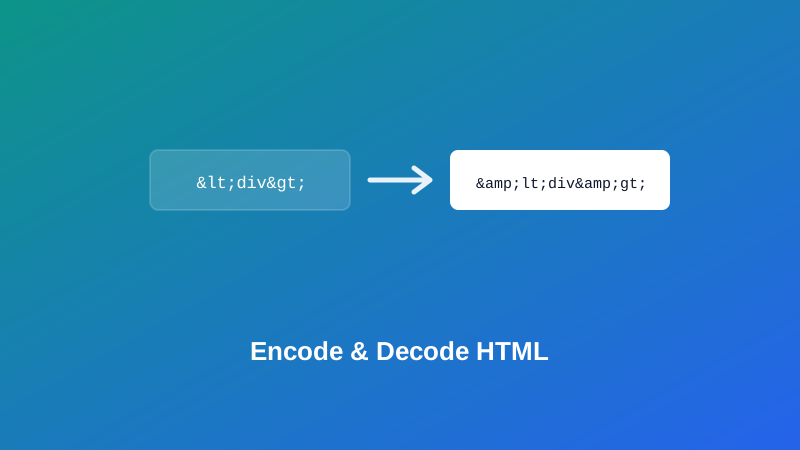
You're writing a tutorial that needs to actually show <div class="card"> as visible text on the page, not have the browser quietly turn it into a real, empty div. Or you're building a page that displays whatever a visitor typed into a comment box, and you'd rather a stray < or & didn't rearrange your layout — or worse, do something you really didn't intend.
This guide covers what HTML encoding actually changes, how to decode it back to normal text, and — since it's the detail that separates a correct implementation from a broken one — exactly why the order you escape characters in matters more than it seems like it should.
What HTML Encoding Actually Does
A handful of characters carry special meaning in HTML: < and > open and close tags, & starts a character reference, and " and ' delimit attribute values. If any of these show up in text that's meant to be displayed rather than interpreted as markup, they need to be swapped for their entity equivalent, so the browser renders the literal character instead of treating it as syntax.
My PDF's HTML Encoder makes exactly this substitution:
| Character | Becomes |
|---|---|
& | & |
< | < |
> | > |
" | " |
' | ' |
Type <div class="card"> in, and you get back <div class="card"> — a string that, when placed inside a page's HTML, displays as the literal text you typed instead of being read as an actual tag.
Why the Order of Escaping Actually Matters
This is worth understanding specifically, because it's a genuine, common bug in hand-rolled versions of this exact function.
The ampersand has to be escaped first, before anything else — and specifically before < and > are escaped. Here's why: if < were converted to < before & had its turn, the & that's now sitting at the start of < would get caught by the very next replacement step and turned into &lt; — a corrupted, double-escaped mess instead of the correct output.
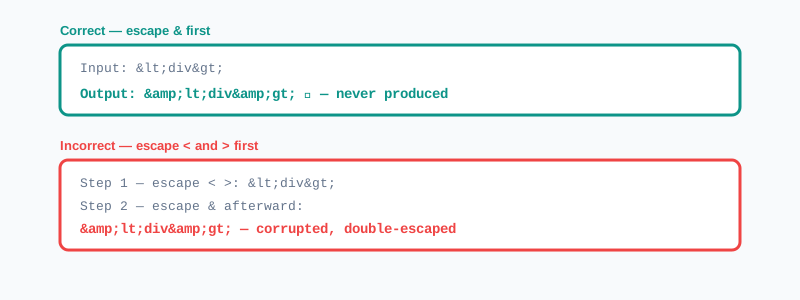
Escaping & first sidesteps this entirely: by the time < and > get converted to < and >, the ampersand-replacement step has already finished, so those newly created entities are never touched again. It's a small sequencing detail, but it's exactly the kind of thing that quietly breaks a hand-written escaping function while looking completely reasonable at a glance.
Why This Matters Beyond Just Display
It's worth being plain about why this isn't just a formatting nicety. When text someone else typed gets inserted directly into a page's HTML without escaping, that person could type actual markup — or a <script> tag — and have the browser execute it as part of your page instead of showing it as plain text. That's the basic mechanism behind a well-known category of vulnerability called cross-site scripting, or XSS.
Encoding vs. Decoding: An Interesting Asymmetry
Here's something worth noticing once you're comfortable with the basics: encoding and decoding aren't mirror images of each other in how much they actually handle.
HTML Encoder only ever needs to produce five specific entities — the ones covered above — because those are the only characters that genuinely need escaping for safe display. HTML Decoder, by contrast, can handle far more than just those five. Paste in ©, …, —, or a numeric entity like ©, and it correctly decodes all of them back to their actual characters — not just the basic five the encoder produces.
That's because decoding here works differently under the hood. Rather than relying on a limited, hand-maintained lookup table, it hands your entity-laden text to the browser's own built-in HTML parser and reads back what that parser produces. Since a real browser already knows how to interpret every valid HTML entity, the decoder inherits that full capability for free — which is why it's considerably more capable than the encoder needs to be. Encoding only ever has to solve one narrow problem; decoding has to be ready for anything.
How to HTML Encode Text, Step by Step
Step 1: Open the HTML Encoder
Go to My PDF's HTML Encoder. No installation or account needed.
Step 2: Paste Your Text or Code
Anything containing <, >, &, or quote characters is a good candidate for encoding.
Step 3: Copy the Escaped Result
The output updates instantly and is ready to paste directly into HTML where it needs to display as literal text.
How to Decode HTML Entities Back to Text, Step by Step
Step 1: Open the HTML Decoder
Go to My PDF's HTML Decoder.
Step 2: Paste the Encoded Text
This works on the basic five entities and on the much wider range the browser's parser understands, like named and numeric character references.
Step 3: Read the Decoded Result
The original, readable text appears immediately.
Practical Examples
Writing documentation that shows real HTML code. A tutorial that needs to display <a href="#">Link</a> as visible text — not an actual clickable link — needs that snippet HTML-encoded first, so the browser shows the code instead of rendering it.
Displaying user-submitted text safely. A comment, review, or form field that gets shown back on a page should be encoded first, so a visitor typing an ampersand or angle bracket doesn't accidentally break the page's layout.
Reading a CMS or RSS export full of entities. Content pulled from some systems arrives with entities like & and ’ scattered throughout instead of plain characters. Decoding it turns it back into normal, readable text before further editing.
Debugging a page that shows literal & instead of &. This is almost always a sign that text got encoded twice — once by the system generating it, and again somewhere downstream. Decoding once should reveal the correct text.
Common Mistakes When Encoding or Decoding HTML
Encoding text that's already encoded. Running already-escaped text through the encoder a second time produces doubled entities like &amp; — a clear sign the input wasn't the original plain text to begin with.
Getting the escaping order wrong in a hand-written function. As covered above, & needs to be escaped before < and > — reversing that order corrupts the output.
Assuming this alone secures an application against XSS. It's the correct underlying principle, but a real application needs this kind of escaping applied consistently and automatically through a templating engine or sanitization library, not as a manual step that's easy to forget in one spot.
Not expecting quotes to change too. Someone anticipating only <, >, and & to be touched can be surprised that " becomes " and ' becomes ' as well — both are escaped for the same underlying reason.
Processing HTML-escaped text as if it were plain text. Running word counts or other text analysis directly on still-encoded content skews the results — decode first, then process.
Tips & Best Practices
- Escape user-supplied text before displaying it, as a baseline habit whenever you're building anything that shows content someone else typed.
- Watch for doubled entities like
&amp;as a clear sign text has been encoded more than once. - Decode entity-heavy exports before further editing, so you're working with readable text rather than escaped markup.
- Don't expect a strict encode-then-decode round trip for entities beyond the basic five — the decoder handles far more than the encoder produces, which is intentional, not an inconsistency.
- Pair this understanding with a real templating or sanitization library for production applications, rather than relying on a manual step applied inconsistently.
Key Takeaways
- HTML encoding escapes five characters —
&,<,>,",'— so they display as literal text instead of being read as markup. - The ampersand must be escaped first; escaping
<or>before it causes a double-escaping bug in the resulting entities. - Unescaped user input displayed directly in HTML is the basic mechanism behind cross-site scripting — escaping it is a fundamental defense, though production applications should apply it automatically through a proper library.
- The decoder handles far more entity types than the encoder produces, since it uses the browser's own HTML parser rather than a limited lookup table.
- Doubled entities like
&amp;are a clear sign text was encoded more than once.
Related Reading
If you're weighing this against a different kind of character escaping, how to URL encode a string covers percent-encoding — a related but distinct problem, solving unsafe characters in a URL rather than in HTML markup. For more guides like this one, browse the full blog or the complete tools directory. For background on the security risk this kind of escaping helps prevent, see Wikipedia's entry on cross-site scripting.
Got text or code to make display-safe? Open the HTML Encoder or HTML Decoder and get your result in seconds.
Comments
Comments aren't open on the blog yet. In the meantime, share this article using the buttons above, or reach us directly at contact@mypdf.tech.