You open a live site's stylesheet in dev tools to see how something was built, and it's a single, unbroken line of characters — every selector, every property, every value crammed together with no spacing at all. Or the opposite problem: you've got a hand-written stylesheet that's ready to ship, and you'd rather not send every byte of indentation and comments down to every visitor who loads the page.
This guide covers both directions — turning unreadable CSS back into something you can actually work with, and shrinking readable CSS down for production — plus what each operation actually changes under the hood, since it's not quite as simple as "compress it" and "uncompress it."
What Formatting and Minifying Actually Do
These are opposite jobs, but they're both working with the exact same information — just rearranging how much of it is there purely for human convenience.
Formatting takes CSS in any state — minified, inconsistently indented, pasted from three different sources — and rebuilds it into a clean, consistent structure: one property per line, matching indentation throughout, and a predictable line break after every selector and closing brace.
Minifying does the reverse. It strips out everything that exists purely for readability — comments, extra whitespace, line breaks, unnecessary spacing around punctuation — leaving behind the smallest version of the file that still means exactly the same thing to a browser.
My PDF's CSS Formatter and CSS Minifier handle these two directions, both entirely in your browser.
How Minifying Actually Shrinks a File
It's worth knowing exactly what's being removed, rather than treating it as a black box. Minifying here:
- Strips all comments — anything between
/*and*/is removed entirely. - Collapses every run of whitespace down to a single space, then removes it entirely around structural punctuation like
{,},:,;,,and>. - Drops a trailing semicolon right before a closing brace, since it's redundant — the brace itself already ends the rule.
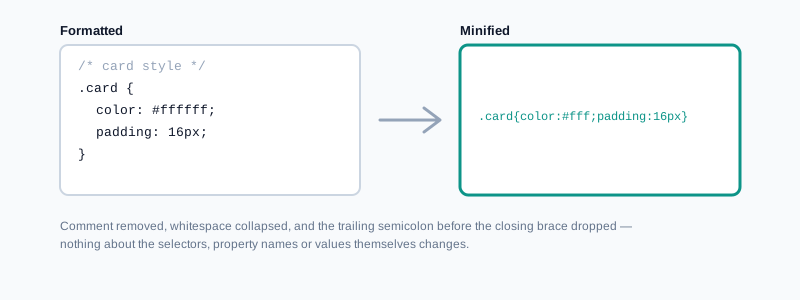
What it deliberately doesn't do is worth knowing too: it doesn't merge duplicate or overlapping rules, shorten color values like #ffffff down to #fff, or restructure selectors the way a dedicated build-tool minifier might during a production build. This is a safe, conservative pass focused on stripping what's purely there for human readability — not a full optimizing compiler.
How to Format CSS, Step by Step
Step 1: Open the CSS Formatter
Go to My PDF's CSS Formatter. No installation or account needed.
Step 2: Paste Your CSS
Whether it's a single minified line or just inconsistently indented, paste it in as-is.
Step 3: Choose an Indent Size
Set how many spaces each level of nesting should use, to match whatever convention your project already follows.
Step 4: Copy or Download the Result
The formatted output updates live and is ready to copy straight into your codebase.
How to Minify CSS, Step by Step
Step 1: Open the CSS Minifier
Go to My PDF's CSS Minifier.
Step 2: Paste Your Formatted CSS
Drop in the readable version you've been working with.
Step 3: Copy or Download the Compact Result
The output is a single, dense block with comments and unnecessary whitespace removed, ready for production.
Practical Examples
Reading a live site's stylesheet. You've pulled up a page's CSS in dev tools and it's one unbroken line. Paste it into CSS Formatter to see it broken out into readable, indented rules — much easier to actually study how something was built.
Shrinking a stylesheet before deployment. A hand-written CSS file with generous comments and spacing is ready to ship. Running it through CSS Minifier strips everything that was only there to help you while writing it, reducing what every visitor has to download.
Cleaning up a teammate's inconsistent formatting before a review. A CSS file with mixed indentation and inconsistent spacing makes it hard to see what an actual change was. Formatting it first turns a noisy diff into one that shows only genuine edits.
Round-tripping between drafts and production. Keep your working copy formatted and readable, minify it right before deployment, and repeat the cycle each time you update the file — treating minification as a final step, not a permanent state.
What This Tool Can't Do
Worth knowing the scope before relying on it for something specific:
- It doesn't preserve comments through either operation. Both formatting and minifying strip them — copy anything important out first.
- It doesn't perform advanced optimizations. No merging duplicate rules, no shortening color values, no restructuring selectors — this is comment-and-whitespace-level minification, not a full build-tool optimizer.
- It doesn't validate your CSS. It reformats or minifies whatever structure it finds; it isn't a linter and won't flag a genuine syntax error.
- It's built for plain CSS, not preprocessor syntax. Sass or Less features like variables, nesting shortcuts, or mixins won't be resolved or understood — those need to be compiled to plain CSS first.
Common Mistakes When Formatting or Minifying CSS
Assuming comments survive formatting. They don't — if a comment explains something important, copy it out before pasting your CSS in, on either tool.
Debugging the minified version instead of the source. Once a file is minified, it's genuinely harder to read and edit. Always keep a formatted, commented source file as the one you actually work in.
Expecting a syntax error to be caught. Neither tool validates CSS — it processes whatever structure it's given. A genuine typo or broken rule needs a linter or your browser's own dev tools to catch.
Pasting Sass or Less source directly. Nested rules, variables, and mixins are preprocessor features that need to be compiled first — this tool works with plain CSS as written, not preprocessor syntax.
Treating minified output as the new working file. It's easy to grab the compact result and keep editing it directly, but that makes every future change harder to review and debug than working from a readable source.
Tips & Best Practices
- Keep a readable, commented source file as your actual working copy. Minify only a duplicate, right before it ships.
- Copy out anything in a comment that matters before running either operation, since neither one keeps comments in the output.
- Use a linter or your browser's dev tools for syntax validation. This tool reformats and compresses structure — it doesn't check correctness.
- Match your indent size to your project's existing style when formatting, so the result fits in cleanly with the rest of your codebase.
- Pair with JavaScript Minifier when preparing a front-end project's assets together for production.
Key Takeaways
- Formatting rebuilds CSS into a clean, consistently indented structure; minifying strips whitespace, comments, and redundant punctuation to shrink file size.
- Both operations remove comments — neither one preserves them, so copy out anything important first.
- Minifying here is deliberately conservative: no renaming, no rule merging, no color shortening — just safe whitespace and comment removal.
- Neither tool validates CSS syntax — use a linter or your browser's dev tools to catch genuine errors.
- Keep a readable, commented source file as your actual working copy, and minify only a duplicate right before deployment.
Related Reading
If you're working with a different data format that also benefits from cleaning up, how to format and beautify JSON covers the same kind of readability problem for API responses and config files. For more guides like this one, browse the full blog or the complete tools directory.
Got a stylesheet to clean up or shrink down? Open the CSS Formatter or CSS Minifier and get your result in seconds.
Comments
Comments aren't open on the blog yet. In the meantime, share this article using the buttons above, or reach us directly at contact@mypdf.tech.